
I like posting LoadRunner code snippets on My Load Test and, judging by the emails and comments that I get, a lot of people find them really useful. To make my code more readable, I have added syntax highlighting that uses the same colours you see in VuGen. If you would like to download a copy of the syntax highlighting code to use on your own blog or forum, or you would like to learn more about how I did it, read on…
There is a neat parser/highlighter called GeSHi, which stands for “Generic Syntax Highlighter”. This was originally developed for phpBB, but is now available for many other blogs and forums. If you are using WordPress, you will find that the WP-Syntax plugin uses GeSHi.
Even though LoadRunner supports a variety of languages (depending on the vuser type), just covering C (and maybe Java) should be enough for most of the code that I plan to share.
LoadRunner C
Here is a simple LoadRunner script as an example of how VuGen does syntax highlighting.
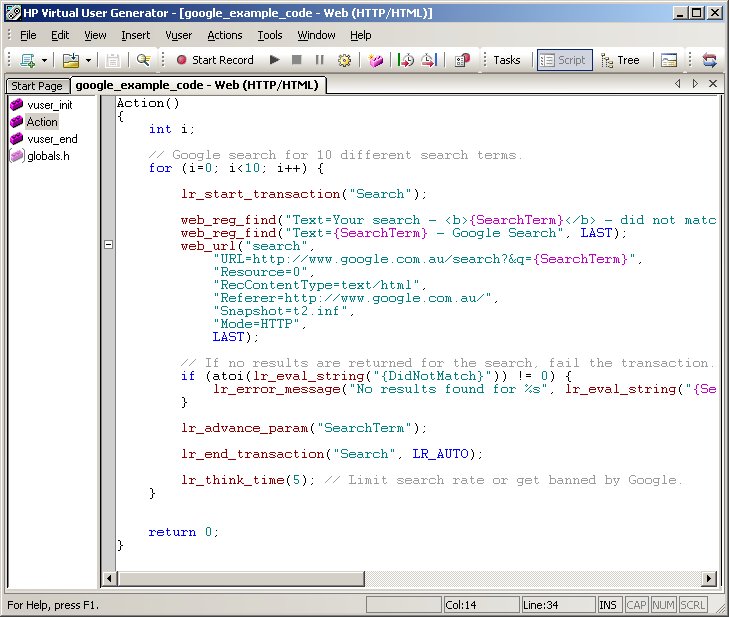
As you can see (if you click on the image to get the larger size), the following elements are coloured differently…
- Comments – Grey (RGB: 155,155,155). LoadRunner supports traditional C-sytle comments “/* */” and C++ style line comments “//”.
- Strings – Green (RGB: 0,128,128). Any text that is in double quote (or single quotes – I guess VuGen’s parser isn’t trying to verify correctness).
- Primitive Types – Blue (RGB: 0,0,255). Primitive types and their modifiers (short, int, long, void, char, float, double, const, enum, struct, union, typedef, etc)
- LoadRunner Parameters – Pink (RGB: 192,0,192). Any part of a string that is in {CurlyBraces}. It has always annoyed me that VuGen does not highlight parameters created with web_reg_save_param or lr_save_param. This is my opportunity to fix this.
- LoadRunner Functions – Brown (RBG: 138,0,0). The common LoadRunner functions that all start with “lr_”, and the protocol-specific functions that start with “web_”, “sapgui_”, etc.
- LoadRunner Constants – Blue. LoadRunner has a huge number of constants (LAST, EXTRARES, LR_AUTO, LR_PASS, LR_FAIL, etc)
- Control Structures – Blue. Looping and conditional statements (if, else, for, do, while, return, continue, break, switch, case, default, goto)
- Preprocessor Directives – Blue. C preprocessor macro definitions (#define, #include, etc)
- Operators, Functions, Variables – Black (RBG: 0,0,0). Basically, any language elements that are left over are coloured black.
Here is the code from the screenshot above in all its syntax-highlighted glory…
Action()
{
    int i;

    // Google search for 10 different search terms.
    for (i=0; i<10; i++) {

        lr_start_transaction("Search");

        web_reg_find("Text=Your search - {SearchTerm} - did not match any documents.", "SaveCount=DidNotMatch", LAST);
        web_reg_find("Text={SearchTerm} - Google Search", LAST);
        web_url("search",
            "URL=http://www.google.com.au/search?&q={SearchTerm}",
            "Resource=0",
            "RecContentType=text/html",
            "Referer=http://www.google.com.au/",
            "Snapshot=t2.inf",
            "Mode=HTTP",
            LAST);

        // If no results are returned for the search, fail the transaction.
        if (atoi(lr_eval_string("{DidNotMatch}")) != 0) {
            lr_error_message("No results found for %s", lr_eval_string("{SearchTerm}")); // Should have "Fail open transactions on lr_error_message" enabled in runtime settings.
        }

        lr_advance_param("SearchTerm");

        lr_end_transaction("Search", LR_AUTO);

        lr_think_time(5); // Limit search rate or get banned by Google.
    }

    return 0;
}
If you would like to add this feature to your own blog, install GeSHi (or a plugin which uses it), and drop the c_loadrunner.php file I created into the ./geshi directory that contains the files that support all the other languages. Enjoy.
Related Posts



17 Comments
Comments are closed.
Note for people who want to use my code with WP-Syntax; you need to follow these steps…
1. Install WP-Syntax (obviously your WordPress blog is already up and running), and enable this plugin.
2. Download my c_loadrunner.php file (remove the “.txt” extension I gave it), and copy it to ./wp-content/plugins/wp-syntax/geshi/geshi
3. Add some code to a blog post inside pre tags like <pre lang="c_loadrunner">lr_output_message("Hello World")</pre>
4. Rejoice, because your code looks just like it does in VuGen.
BUGS
* If your code is within <pre> tags, then the browser will handle tab size for you. To guarantee that your visitors will see tabs that are 4 spaces wide, you can replace your tabs with…four spaces.
*
LoadRunner parameters are not highlighted. I can’t get this working. I have sent a question about this to the GeSHi developers mailing list. Fixed.Benny Baumann (a GeSHi developer) pointed me in the right direction to fix my bug with highlighting of LoadRunner parameters.
I have updated the LoadRunner Language File with the bugfix.
Hi Stuart,
I saw your blog post and thought I’d use the code, but this link doesn’t work.
https://www.myloadtest.com/files/c_loadrunner.php.txt
Is there any chance that you can repost the code?
All the best
Richard
P.S. Great site, thanks for sharing..
Sorry Richard. I had removed the file temporarily due to the bugs mentioned above but, even with the outstanding bugs, I guess it is still usable. 🙂
I have put the GeSHI language file for LoadRunner back up.
Please send me an email (or leave a comment) if you find more bugs or have any feature requests.
Hi Stuart,
Thanks for posting this. I’ve been looking for an easy way to get LoadRunner syntax highlighting into my documents and reports for some time now. I followed your advice and installed GeSHi together with your php file on my website.
I’ve published the resulting GeSHi tool so that I can use it wherever I have an Internet connection so that I can use it regardless of the client site where I’m working. http://bish.co.uk/geshi/example.php
I’ve written an article about this for my website and linked to your site. I hope that you don’t mind.
http://www.bish.co.uk/index.php?option=com_content&view=article&id=104:loadrunner-syntax-highlighting-with-geshi&catid=34:recent&Itemid=1
Thanks once again for your efforts for the wider testing community.
All the best
Richard
Nice one Richard, I will have to use your tool next time I need to cut and paste syntax highlighted LoadRunner code into a Word Document or email.
Cheers,
Stu.
Do you have a similar example for unsing a if – else based on details returned per iteration?
I have scripted and on the second iteration want to use other section of code…please see below example. I a mstruggling to get to use the second batch of code (else) on the second iteration.
if(atoi(lr_eval_string(“{Iteration}”))==1);
{
//For Iteration 1 I want to use the detail as per below…
lr_start_transaction(“create”);
web_reg_find(“Text=Create New Client”,
LAST);
// [WCSPARAM WCSParam_Diff4 9 !753c72ad] Parameter {WCSParam_Diff4} created by Correlation Studio
web_reg_save_param( “WCSParam_Diff4”, “LB= value=\””, “RB=\””, “Ord=20”, “IgnoreRedirections=Yes”, “Search=Body”, “RelFrameId=1”, LAST );
web_submit_data(“w2000.jspx”,
“Action={application}/mfonline/faces/pages/forms/customer/w2000.jspx?_afPfm={WCSParam_Diff5}”,
“Method=POST”,
“EncType=multipart/form-data”,
“RecContentType=text/html”,
“Referer={application}/mfonline/faces/pages/forms/user/w8M0A.jspx”,
“Snapshot=t9.inf”,
“Mode=HTML”,
ITEMDATA,
“Name=focusRestoreHolder”, “Value=W8M00Form:password”, ENDITEM,
“Name=W2000Form:POLICY_NO”, “Value=”, ENDITEM,
“Name=W2000Form:CIVIL_REG_CODE”, “Value=”, ENDITEM,
“Name=W2000Form:compRegNo”, “Value=”, ENDITEM,
“Name=W2000Form:SURNAME”, “Value=”, ENDITEM,
“Name=W2000Form:btn_search”, “Value=Search”, ENDITEM,
“Name=W2000Form:btn_clear”, “Value=Clear”, ENDITEM,
“Name=W2000Form:btn_pdf”, “Value=Report”, ENDITEM,
“Name=W2000Form:btn_memoryList”, “Value=Memory”, ENDITEM,
“Name=W2000Form:searchClientPolDataTable:rangeStart”, “Value=0”, ENDITEM,
“Name=W2000Form:btnCreateClient”, “Value=Create Personal Client”, ENDITEM,
“Name=org.apache.myfaces.trinidad.faces.FORM”, “Value=W2000Form”, ENDITEM,
“Name=org.apache.myfaces.trinidad.faces.STATE”, “Value={WCSParam_Diff3}”, ENDITEM,
“Name=state”, “Value=”, ENDITEM,
“Name=value”, “Value=”, ENDITEM,
“Name=source”, “Value=W2000Form:btnCreateClient”, ENDITEM,
LAST);
lr_end_transaction(“create personal client button”,LR_AUTO);
lr_think_time(29);
lr_start_transaction(“create personal client”);
// [WCSPARAM WCSParam_Diff6 9 !753c72ae] Parameter {WCSParam_Diff6} created by Correlation Studio
web_reg_save_param( “WCSParam_Diff6”, “LB= value=\””, “RB=\””, “Ord=20”, “IgnoreRedirections=Yes”, “Search=Body”, “RelFrameId=1”, LAST );
web_submit_data(“w2M00.jspx”,
“Action={application}/mfonline/faces/pages/forms/customer/w2M00.jspx?_afPfm={WCSParam_Diff5}.1.1”,
“Method=POST”,
“EncType=multipart/form-data”,
“RecContentType=text/html”,
“Referer={application}/mfonline/faces/pages/forms/customer/w2000.jspx?_afPfm={WCSParam_Diff5}”,
“Snapshot=t10.inf”,
“Mode=HTML”,
ITEMDATA,
“Name=focusRestoreHolder”, “Value=W2M00Form:CREDIT_RATING_YN:_1”, ENDITEM,
“Name=W2M00Form:ID_TYPE”, “Value=5”, ENDITEM,
“Name=W2M00Form:CIVIL_REG_CODE”, “Value={pUnique_ID}”, ENDITEM,
“Name=W2M00Form:SURNAME”, “Value=Tester”, ENDITEM,
“Name=W2M00Form:INITIALS”, “Value=PT”, ENDITEM,
“Name=W2M00Form:CREDIT_RATING_YN”, “Value=1”, ENDITEM,
“Name=W2M00Form:BTN_CANCEL”, “Value=Cancel”, ENDITEM,
“Name=W2M00Form:BTN_CREATE_CLIENT”, “Value=Create”, ENDITEM,
“Name=org.apache.myfaces.trinidad.faces.FORM”, “Value=W2M00Form”, ENDITEM,
“Name=org.apache.myfaces.trinidad.faces.STATE”, “Value={WCSParam_Diff4}”, ENDITEM,
“Name=source”, “Value=W2M00Form:BTN_CREATE_CLIENT”, ENDITEM,
LAST);
web_url(“buttonBgDis.png”,
“URL={application}/mfonline/img/mfonline/buttonBgDis.png”,
“Resource=0”,
“RecContentType=text/plain”,
“Referer={application}/mfonline/faces/pages/forms/customer/w2M00.jspx?_afPfm={WCSParam_Diff5}.1.1”,
“Snapshot=t11.inf”,
“Mode=HTML”,
LAST);
lr_end_transaction(“create personal client”,LR_AUTO);
}
//for iteration 2 I want to use this sectio of code
else
{
lr_think_time(16);
lr_start_transaction(“create personal client”);
// [WCSPARAM WCSParam_Diff35 9 !753c72ce] Parameter {WCSParam_Diff35} created by Correlation Studio
web_reg_save_param( “WCSParam_Diff35”, “LB= value=\””, “RB=\””, “Ord=20”, “IgnoreRedirections=Yes”, “Search=Body”, “RelFrameId=1”, LAST );
web_submit_data(“w2000.jspx_2”,
“Action={application}/mfonline/faces/pages/forms/customer/w2000.jspx?_afPfm={WCSParam_Diff5}.1.1.1.4.1.1.1.4.1”,
“Method=POST”,
“EncType=multipart/form-data”,
“RecContentType=text/html”,
“Referer={application}/mfonline/faces/pages/forms/sales/w1M08.jspx?_afPfm={WCSParam_Diff5}.1.1.1.4.1.1.1.4”,
“Snapshot=t90.inf”,
“Mode=HTML”,
ITEMDATA,
“Name=focusRestoreHolder”, “Value=W1M08Form:broker_email”, ENDITEM,
“Name=W2000Form:POLICY_NO”, “Value={WCSParam_Diff21}”, ENDITEM,
“Name=W2000Form:CIVIL_REG_CODE”, “Value={pUnique_ID}”, ENDITEM,
“Name=W2000Form:compRegNo”, “Value=”, ENDITEM,
“Name=W2000Form:SURNAME”, “Value=”, ENDITEM,
“Name=W2000Form:btn_search”, “Value=Search”, ENDITEM,
“Name=W2000Form:btn_clear”, “Value=Clear”, ENDITEM,
“Name=W2000Form:btn_pdf”, “Value=Report”, ENDITEM,
“Name=W2000Form:btn_memoryList”, “Value=Memory”, ENDITEM,
“Name=W2000Form:searchClientPolDataTable:rangeStart”, “Value=0”, ENDITEM,
“Name=W2000Form:btnCreateClient”, “Value=Create Personal Client”, ENDITEM,
“Name=org.apache.myfaces.trinidad.faces.FORM”, “Value=W2000Form”, ENDITEM,
“Name=org.apache.myfaces.trinidad.faces.STATE”, “Value={WCSParam_Diff34}”, ENDITEM,
“Name=source”, “Value=W2000Form:btnCreateClient”, ENDITEM,
“Name=state”, “Value=”, ENDITEM,
“Name=value”, “Value=”, ENDITEM,
LAST);
lr_end_transaction(“create personal client”,LR_AUTO);
}
the script passes on the first iteration, but fails on the second
My bad – here is a colour version
if(atoi(lr_eval_string(“{Iteration}”))==1);
{
lr_start_transaction(“create”);
web_reg_find(“Text=Create New Client”,
LAST);
// [WCSPARAM WCSParam_Diff4 9 !753c72ad] Parameter {WCSParam_Diff4} created by Correlation Studio
web_reg_save_param( “WCSParam_Diff4”, “LB= value=\””, “RB=\””, “Ord=20”, “IgnoreRedirections=Yes”, “Search=Body”, “RelFrameId=1”, LAST );
web_submit_data(“w2000.jspx”,
“Action={application}/mfonline/faces/pages/forms/customer/w2000.jspx?_afPfm={WCSParam_Diff5}”,
“Method=POST”,
“EncType=multipart/form-data”,
“RecContentType=text/html”,
“Referer={application}/mfonline/faces/pages/forms/user/w8M0A.jspx”,
“Snapshot=t9.inf”,
“Mode=HTML”,
ITEMDATA,
“Name=focusRestoreHolder”, “Value=W8M00Form:password”, ENDITEM,
“Name=W2000Form:POLICY_NO”, “Value=”, ENDITEM,
“Name=W2000Form:CIVIL_REG_CODE”, “Value=”, ENDITEM,
“Name=W2000Form:compRegNo”, “Value=”, ENDITEM,
“Name=W2000Form:SURNAME”, “Value=”, ENDITEM,
“Name=W2000Form:btn_search”, “Value=Search”, ENDITEM,
“Name=W2000Form:btn_clear”, “Value=Clear”, ENDITEM,
“Name=W2000Form:btn_pdf”, “Value=Report”, ENDITEM,
“Name=W2000Form:btn_memoryList”, “Value=Memory”, ENDITEM,
“Name=W2000Form:searchClientPolDataTable:rangeStart”, “Value=0”, ENDITEM,
“Name=W2000Form:btnCreateClient”, “Value=Create Personal Client”, ENDITEM,
“Name=org.apache.myfaces.trinidad.faces.FORM”, “Value=W2000Form”, ENDITEM,
“Name=org.apache.myfaces.trinidad.faces.STATE”, “Value={WCSParam_Diff3}”, ENDITEM,
“Name=state”, “Value=”, ENDITEM,
“Name=value”, “Value=”, ENDITEM,
“Name=source”, “Value=W2000Form:btnCreateClient”, ENDITEM,
LAST);
lr_end_transaction(“create personal client button”,LR_AUTO);
lr_think_time(29);
lr_start_transaction(“create personal client”);
// [WCSPARAM WCSParam_Diff6 9 !753c72ae] Parameter {WCSParam_Diff6} created by Correlation Studio
web_reg_save_param( “WCSParam_Diff6”, “LB= value=\””, “RB=\””, “Ord=20”, “IgnoreRedirections=Yes”, “Search=Body”, “RelFrameId=1”, LAST );
web_submit_data(“w2M00.jspx”,
“Action={application}/mfonline/faces/pages/forms/customer/w2M00.jspx?_afPfm={WCSParam_Diff5}.1.1”,
“Method=POST”,
“EncType=multipart/form-data”,
“RecContentType=text/html”,
“Referer={application}/mfonline/faces/pages/forms/customer/w2000.jspx?_afPfm={WCSParam_Diff5}”,
“Snapshot=t10.inf”,
“Mode=HTML”,
ITEMDATA,
“Name=focusRestoreHolder”, “Value=W2M00Form:CREDIT_RATING_YN:_1”, ENDITEM,
“Name=W2M00Form:ID_TYPE”, “Value=5”, ENDITEM,
“Name=W2M00Form:CIVIL_REG_CODE”, “Value={pUnique_ID}”, ENDITEM,
“Name=W2M00Form:SURNAME”, “Value=Tester”, ENDITEM,
“Name=W2M00Form:INITIALS”, “Value=PT”, ENDITEM,
“Name=W2M00Form:CREDIT_RATING_YN”, “Value=1”, ENDITEM,
“Name=W2M00Form:BTN_CANCEL”, “Value=Cancel”, ENDITEM,
“Name=W2M00Form:BTN_CREATE_CLIENT”, “Value=Create”, ENDITEM,
“Name=org.apache.myfaces.trinidad.faces.FORM”, “Value=W2M00Form”, ENDITEM,
“Name=org.apache.myfaces.trinidad.faces.STATE”, “Value={WCSParam_Diff4}”, ENDITEM,
“Name=source”, “Value=W2M00Form:BTN_CREATE_CLIENT”, ENDITEM,
LAST);
web_url(“buttonBgDis.png”,
“URL={application}/mfonline/img/mfonline/buttonBgDis.png”,
“Resource=0”,
“RecContentType=text/plain”,
“Referer={application}/mfonline/faces/pages/forms/customer/w2M00.jspx?_afPfm={WCSParam_Diff5}.1.1”,
“Snapshot=t11.inf”,
“Mode=HTML”,
LAST);
lr_end_transaction(“create personal client”,LR_AUTO);
}
else{
lr_think_time(16);
lr_start_transaction(“create personal client”);
// [WCSPARAM WCSParam_Diff35 9 !753c72ce] Parameter {WCSParam_Diff35} created by Correlation Studio
web_reg_save_param( “WCSParam_Diff35”, “LB= value=\””, “RB=\””, “Ord=20”, “IgnoreRedirections=Yes”, “Search=Body”, “RelFrameId=1”, LAST );
web_submit_data(“w2000.jspx_2”,
“Action={application}/mfonline/faces/pages/forms/customer/w2000.jspx?_afPfm={WCSParam_Diff5}.1.1.1.4.1.1.1.4.1”,
“Method=POST”,
“EncType=multipart/form-data”,
“RecContentType=text/html”,
“Referer={application}/mfonline/faces/pages/forms/sales/w1M08.jspx?_afPfm={WCSParam_Diff5}.1.1.1.4.1.1.1.4”,
“Snapshot=t90.inf”,
“Mode=HTML”,
ITEMDATA,
“Name=focusRestoreHolder”, “Value=W1M08Form:broker_email”, ENDITEM,
“Name=W2000Form:POLICY_NO”, “Value={WCSParam_Diff21}”, ENDITEM,
“Name=W2000Form:CIVIL_REG_CODE”, “Value={pUnique_ID}”, ENDITEM,
“Name=W2000Form:compRegNo”, “Value=”, ENDITEM,
“Name=W2000Form:SURNAME”, “Value=”, ENDITEM,
“Name=W2000Form:btn_search”, “Value=Search”, ENDITEM,
“Name=W2000Form:btn_clear”, “Value=Clear”, ENDITEM,
“Name=W2000Form:btn_pdf”, “Value=Report”, ENDITEM,
“Name=W2000Form:btn_memoryList”, “Value=Memory”, ENDITEM,
“Name=W2000Form:searchClientPolDataTable:rangeStart”, “Value=0”, ENDITEM,
“Name=W2000Form:btnCreateClient”, “Value=Create Personal Client”, ENDITEM,
“Name=org.apache.myfaces.trinidad.faces.FORM”, “Value=W2000Form”, ENDITEM,
“Name=org.apache.myfaces.trinidad.faces.STATE”, “Value={WCSParam_Diff34}”, ENDITEM,
“Name=source”, “Value=W2000Form:btnCreateClient”, ENDITEM,
“Name=state”, “Value=”, ENDITEM,
“Name=value”, “Value=”, ENDITEM,
LAST);
lr_end_transaction(“create personal client”,LR_AUTO);
}
Hi Stuart,
I am new to this field and i have a doubt about the above code snippet.
Why u have initialized a variable i in this script while we can increase the iteration number in run time settings to 10.
PS:: I have not used vugen apart from record and playback :-p
I would always recommend that your VuGen scripts should use the Run Logic runtime settings to control iteration at a business-process level, instead of writing a for loop.
In this case, I just needed a code example that showed all of the elements of the language that could be highlighted (including primitive types, variables and operators). A for loop was the perfect example to show off the syntax highlighting, but not necessarily VuGen scripting best practices. Good pickup. 🙂
Hi Stuart Moncrieff ,
I am new to load runner but i know vbscript.I dont knw how to start load runner can you provide me materila for load runner to learn concepts wise.
Hi Dhivya,
Learning load runner, HP has very good documentation and try to lnstall a trial version of the load runner. Also its a plus, if you know C language basics.
Hi Dhivya,
Learning load runner, HP has very good documentation and try to lnstall a trial version of the load runner. Also its a plus, if you know C language basics.
How I open,read and write a file from Load runner?
Hello All,
I want to do Performance testing of Windows base application by using Load Runner . Can any buddy tel me how to do it ? Is there any method for the same. Please let me know ASAP.
Stewie
I used your website for a long time and hope you now keep your own blog up to date since you have left JDS. I mentioned it to you person, how often I use your blog and thanked you for a valuable resource. Other than code snippets that are very useful. Mostly due to I know they are there and I can access them at clients sites that have firewalls that prevent access to my own drop box repository of previous code that I have written. This is getting less and less now days with a 4g mobile. Yourself are one of the few that know how to troubleshoot load runner issues and give examples of how you approach these issues. This to me is what the industry at large needs help with, too many throw their hands in air and point the finger at the load testing tool rather than their ability to think outside the square and take ownership of the issue’s until resolved. However your blog other than the 1000’s of offshore resources trying to copy and paste code and others in their pursuit of the claim of being a “Senior Load Tester” to show their project key stake holders the impressive code that “They have written” but unfortunately they hit another problem they cannot solve. This comes un-stuck when they bring in a temp like me that states all they have done for the last x months is copy paste from stewie’s blog and because there is no example code on his site to deal with this issue, that idiot has just been sitting there and blaming the tool rather than the real road blocker that sits between the keyboard and the chair for bloody months now, how much money have you idiots wasted employing yet another offshore resource. I love those meetings 🙂 However your blog also attracts everyone in industry, people such as Doug Sayer Jones told myself with pride that he solved one of your tech challenges even though he is not the type person that tech challenge was aimed at in helping people to learn something by thinking and researching. He was bored one night and decided to answer the question that was on your blogs for a very long time. The comments section in your blog is very useful in finding others in the industry that I would probably never met, like Richard from the UK who like yourself, has a very good blog and now when I have time I sit and read his blog which goes from subject to subject :). I hope you’re doing well stewie, see ya around soon mate, I hope.