
On a recent project, I needed to run a performance test where tens of thousands of network devices communicate with a DHCP server. After the test, I wanted to create a pretty graph of the number of DHCP requests hitting the server.
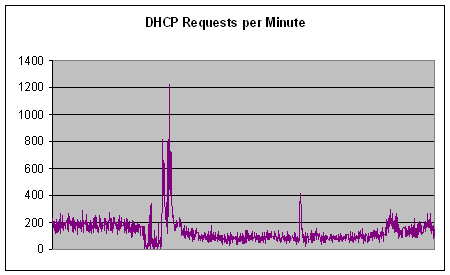
Using a combination of AWK and Excel, I had a solution within half an hour…
The DHCP server writes events to a log file like this:
Aug  8 00:00:01 rchmms010 dhcpd: DHCPDISCOVER from 00:1d:ed:40:5f:b6 via 10.1.255.254
Aug  8 00:00:01 rchmms010 dhcpd: DHCPOFFER on 10.1.210.152 to 00:1d:ed:40:5f:b6 via 10.1.255.254
Aug  8 00:00:01 rchmms010 dhcpd: DHCPDISCOVER from 00:1d:ed:40:53:e8 via 10.1.255.254
Aug  8 00:00:01 rchmms010 dhcpd: DHCPOFFER on 10.1.239.99 to 00:1d:ed:40:53:e8 via 10.1.255.254
Aug  8 00:00:01 rchmms010 dhcpd: DHCPREQUEST for 10.1.239.99 (172.25.30.115) from 00:1d:ed:40:53:e8 via 10.1.255.254
Aug  8 00:00:01 rchmms010 dhcpd: DHCPACK on 10.1.239.99 to 00:1d:ed:40:53:e8 via 10.1.255.254
Aug  8 00:00:02 rchmms010 dhcpd: DHCPDISCOVER from 00:1d:ed:40:89:7d via 10.1.255.254
Aug  8 00:00:02 rchmms010 dhcpd: DHCPOFFER on 10.0.178.200 to 00:1d:ed:40:89:7d via 10.1.255.254
Aug  8 00:00:04 rchmms010 dhcpd: DHCPDISCOVER from 00:1d:ed:40:5f:b6 via 10.1.255.254
Aug  8 00:00:04 rchmms010 dhcpd: DHCPOFFER on 10.1.210.152 to 00:1d:ed:40:5f:b6 via 10.1.255.254
Aug  8 00:00:04 rchmms010 dhcpd: DHCPREQUEST for 10.1.210.152 (172.25.30.115) from 00:1d:ed:40:5f:b6 via 10.1.255.254
Aug  8 00:00:04 rchmms010 dhcpd: DHCPACK on 10.1.210.152 to 00:1d:ed:40:5f:b6 via 10.1.255.254
Aug  8 00:00:05 rchmms010 dhcpd: DHCPDISCOVER from 00:1d:ed:40:55:f4 via 10.1.255.254
Aug  8 00:00:05 rchmms010 dhcpd: DHCPOFFER on 10.0.187.211 to 00:1d:ed:40:55:f4 via 10.1.255.254
Aug  8 00:00:05 rchmms010 dhcpd: DHCPDISCOVER from 00:1d:ed:40:89:7d via 10.1.255.254
Aug  8 00:00:05 rchmms010 dhcpd: DHCPOFFER on 10.0.178.200 to 00:1d:ed:40:89:7d via 10.1.255.254
Aug  8 00:00:05 rchmms010 dhcpd: DHCPDISCOVER from 00:1d:ed:40:79:19 via 10.1.255.254
Aug  8 00:00:05 rchmms010 dhcpd: DHCPOFFER on 10.0.200.135 to 00:1d:ed:40:79:19 via 10.1.255.254
Aug  8 00:00:05 rchmms010 dhcpd: DHCPREQUEST for 10.0.178.200 (172.25.30.115) from 00:1d:ed:40:89:7d via 10.1.255.254
Aug  8 00:00:05 rchmms010 dhcpd: DHCPACK on 10.0.178.200 to 00:1d:ed:40:89:7d via 10.1.255.254
Obviously there are four message types: DHCPDISCOVER, DHCPOFFER, DHCPREQUEST, and DHCPACK. But the highly observant among you will have also noticed that the number of columns (space delimited) differs depending on the message type (DHCPDISCOVER=10, DHCPOFFER=12, DHCPREQUEST=13, DHCPACK=12).
Just to make things more difficult, there are occasional rows that have 11 and 15 columns.
Aug  8 00:10:46 rchmms010 dhcpd: uid lease 10.0.251.247 for client 00:1d:ed:40:2d:75 is duplicate on 10.0/15
Aug  8 00:30:58 rchmms010 dhcpd: Wrote 39312 leases to leases file.
The varying number of columns makes it impractical to process the logs using LogParser (which would have been a really neat solution), and the fact that the log file may have millions of rows means that Excel (by itself) is not the right tool either.
I wanted to aggregate the different types of request for each minute, and output a file for graphing in Excel. Writing a simple AWK program was a neat way to process the log file.
# This aggregates DHCP log files into types of request per minute.
# Types of request: DHCPDISCOVER, DHCPOFFER, DHCPREQUEST, DHCPACK
#
# Usage: gawk -f aggregate_dhcp.awk dhcp.log.1
#
# References:
#    The GNU Awk User's Guide (http://www.gnu.org/manual/gawk/gawk.html)
#    Wikipedia: DHCP (http://en.wikipedia.org/wiki/Dynamic_Host_Configuration_Protocol)

BEGIN {
    FS = " " # fields in the input file must be separated by a space.
    OFS = "\t" # Output Field Separator is a tab.

    previousTime = ""
    previousDay = ""
    outputFile = "" # The file name will change depending on the date of the DHCP event in the log.

    # Keep a count of the different DHCP message types.
    numDhcpDiscover = 0
    numDhcpOffer = 0
    numDhcpRequest = 0
    numDhcpAck = 0

    print "Started processing DHCP log..."
}

# Do this for every line in the input file
{
    if ($6 == "DHCPDISCOVER") {
        numDhcpDiscover++
    } else if ($6 == "DHCPOFFER") {
        numDhcpOffer++
    } else if ($6 == "DHCPREQUEST") {
        numDhcpRequest++
    } else if ($6 == "DHCPACK") {
        numDhcpAck++
    } else {
        print $0 >> "errors.txt"
    }

    # Write a new header for each output file (1 output file for each day)
    currentDay = $2
    if (currentDay != previousDay) {
        outputFile = "DHCP_log_" $1 "_" $2 ".txt"

        # Time	DHCPDISCOVER	DHCPOFFER	DHCPREQUEST	DHCPACK
        print "Time", "DHCPDISCOVER", "DHCPOFFER", "DHCPREQUEST", "DHCPACK" >> outputFile

        previousDay = currentDay
    }

    currentTime = substr($3, 0, 5) # Convert hh:mm:ss to hh:mm
    if (currentTime != previousTime) {
        # Output format:
        # Time	DHCPDISCOVER	DHCPOFFER	DHCPREQUEST	DHCPACK
        print currentTime, numDhcpDiscover, numDhcpOffer, numDhcpRequest, numDhcpAck >> outputFile

        # Reset counters.
        numDhcpDiscover = 0
        numDhcpOffer = 0
        numDhcpRequest = 0
        numDhcpAck = 0

        previousTime = currentTime
    }
}

END {
    print "Finished."
}
Here is the output of the AWK program (for the first 15 minutes of the DHCP server’s log file):
Time	DHCPDISCOVER	DHCPOFFER		DHCPREQUEST	DHCPACK
00:00	102	101	63	64
00:01	84	84	47	47
00:02	81	81	43	43
00:03	106	107	62	61
00:04	93	92	51	52
00:05	101	101	57	57
00:06	65	65	39	39
00:07	79	79	44	44
00:08	76	76	45	45
00:09	86	87	56	55
00:10	120	119	66	67
00:11	106	107	60	59
00:12	101	100	63	64
00:13	83	83	54	54
00:14	66	66	37	37
00:15	82	82	48	48
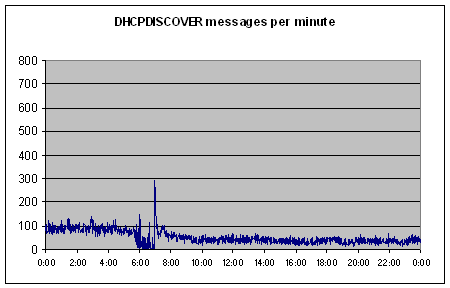
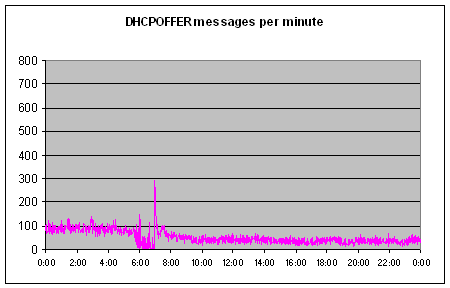
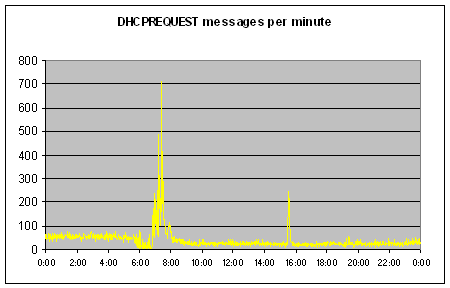
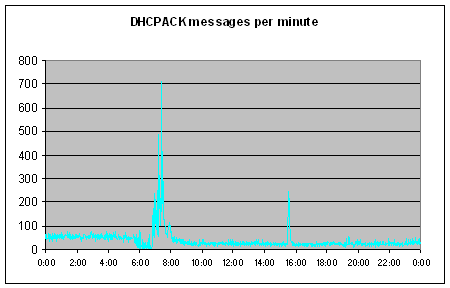
…and here are some example graphs:
Related Posts



6 Comments
Comments are closed.
Note that the graphs above are just from a normal day on the DHCP server, not from my actual performance test. 🙂
Nice work Stu!!
Although I could have done it in less lines in Perl 🙂
I’m sure you could write it in less lines of Perl, but would anybody be able to read it? 😉
Awk rocks, used to use it a lot. I notice these days though, the data matches the tools more, so I haven’t had to reach for it in a long time.
On gawk 1.4.0.1 we have errors:
gawk: /var/www/sites/system/dhcpawktest.awk:24: BEGIN {
gawk: /var/www/sites/system/dhcpawktest.awk:24: ^ syntax error
gawk: /var/www/sites/system/dhcpawktest.awk:82: END {
gawk: /var/www/sites/system/dhcpawktest.awk:82: ^ syntax error
gawk: /var/www/sites/system/dhcpawktest.awk:84:
gawk: /var/www/sites/system/dhcpawktest.awk:84: ^ syntax error
I think that the space character between the “BEGIN” and the “{” is causing the syntax error for you. See Stack Overflow: BEGIN and END causing syntax error in gawk.
yep 😐