
A common question on the LoadRunner support forums is “I’ve got an application that uses this new thing called AJAX. Will LoadRunner work with my application?” …and the answer is “yes…but…”.
The “but” is a big one . An “AJAX” application can mean anything from a simple webpage that updates some fields with information from the server (without reloading the whole page), to a horribly complicated rich GUI interface created with JavaScript.
Of course LoadRunner is going to be able to handle anything that is sent over HTTP, but scripting might not be the usual simple Record-Correlate-Playback, and the chances of the new Click and Script vuser type working are much lower than with a standard web application.
As a quick introduction to AJAX I have prepared an exercise using the simplest AJAX application that I could find.
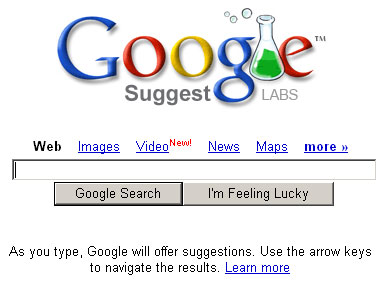
Google Suggest is just like Google’s regular search interface, except that every time you type a letter in the search field, a request is made to the server that returns search suggestions.
The exercises are as follows:
- Become familiar with the application – both at an end-user level, and at the HTTP level. Record the script in HTML and URL mode, then try the Click and Script vuser type (at the time of writing, this vuser type will not correctly record the application).
- Create a script for this application. It should accept a parameter file that contains a valid search term on each line. Create the following transactions load_search_page, enter_character (called every time a character is entered in the search field), and final_search (where the Google Search button is pressed).
- Imagine that you’ve noticed an odd step-like pattern in the Percentile graph in LoadRunner analysis. You hypothesise that response times differ depending on how many characters have been entered in the search field. Modify the enter_character transaction name to include the length of the search term every time it is called.
Treat this with the same level of care that you would give a script that you were creating for a paying client.
I have added some notes and a solution script to the comments section of this post. If you are going to attempt this exercise, please do so before reading the comments.
Related Posts



36 Comments
Comments are closed.
This should be a quick exercise to complete.
Exercise 1:
There are no deliverables for this one, but this should give people a better idea of how the application works, and what scripts recorded with the different vuser types look like.
Exercise 2:
There is no correlation required for this script, so it should be quick to complete.
Here is the solution script [Note: google_suggest.zip has been removed to encouage people to complete the exercise. Email me if you would like the solution!].
At a minimum, I would be looking for a script that functions correctly.
Extra bonus points for
* remembering to put some kind of verification check for every request.
* adding think time between each keypress – will a real user send requests as fast as the server will respond?
* removing any web_add_cookie() function calls – are you planning on simulating the same user ever time?
* discovering the lr_save_var() function, which saves any messy and error prone string manipulation using C.
* noticing that on the final search, all spaces are converted to plus signs, and doing the same with the script – you could take a gamble and hope that because the application still works even though you don’t do this, then any performance test results will still be valid. You could even run test to see if this was the case but, in the end, it is much simpler to just ensure that your virtual user is doing the same things as a real user.
Exercise 3:
Creating dynamic transaction names requires a trivial change to the script, but this is a useful technique to add to your repertoire.
To BE CLEAR MORE ON AJAX VERSION SCALABILITY AND PERFORMANCE
Clearly this post is about creating a script for load testing a simple AJAX application, not a post about scalability and performance of AJAX as a whole.
But how could I resist a one-line comment IN ALL CAPS?
AJAX is a web programming technique, so clearly does not have versions.
Just like any web application, the scalability and performance a web application that uses AJAX may be determined through appropriate testing under load.
Unfortunately usage profiles and end-user behaviour can be significantly more complicated with an AJAX application, making scripting potentially more difficult. As the above example shows, there is likely to be significant additional effort required when scripting due to the way the technology works also. Don’t even get me started on the problems you are going to have trying to create a script for one of the new rich web toolkits that are out there.
When used incorrectly (or for inappropriate tasks), AJAX can make the end-user more aware of response times instead of speeding things up by no longer requiring a reload of the whole page. In a development environment with low network latency this is not noticeable, but when you have 300ms of latency you will see how annoying it is. Include this in your manual performance testing if possible.
Finally, AJAX (or frames, now that I think about it) opens the possibility of multiple HTTP requests from the same user at the same time. Normally web developers don’t have to think about threadsafety as each user’s data was safely isolated in their user session data. Now, if you do something silly, you can do two (incompatible) things at once with a single user’s data.
I saw this recently where, under some very rare circumstances, a Java hashtable (the implementation of which is not threadsafe) in the user’s session would get stuck in an infinite loop. Sometimes an update and a read request would occur at the same time, which would cause this problem.
Cheers,
Stuart.
The Wikipedia entry for AJAX agrees with you about the potential problems with network latency:
Response-time concerns
Network latency — or the interval between user request and server response — needs to be considered carefully during Ajax development. Without clear feedback to the user, smart preloading of data and proper handling of the XMLHttpRequest object, users might experience delay in the interface of the web application, something which users might not expect or understand. Additionally, when an entire page is rendered there is a brief moment of re-adjustment for the eye when the content changes. The lack of this re-adjustment with smaller portions of the screen changing makes the latency more apparent. The use of visual feedback (such as throbbers) to alert the user of background activity and/or preloading of content and data are often suggested solutions to these latency issues.
In general the potential impact of latency has not been “solved” by any of the open source Ajax toolkits and frameworks available today, such as the effect of latency variance over time.
Can u send me some docs which shows LR with AJAX supports for performance and load testing.
Hi,
I’m currently working on a web application where the Left boundaries and Right boundaries are same across some 10 values.But here I want to capture only the 7th Value.Is using the ordinance the only way to do this?
Regards,
Ganesh
Can you forward an example of a LR with AJAX supports for performance and load testing
Hi,
Though this may not be the right place to post this, but I would like to put forward this scenario for anyone willing to try.
I am reading a text file in LR and I wish that it would be read by the FIRST Vuser only with VuserID = 1. This may seem straightforward by using lr_whoami(), but it seems when threads are spawned in LR Controller its not clear which thread executes first. Like for e.g. if there are 10 threads VuserID =2 may execute the script first. Sometimes the thread numbering also doesn’t start from 1. Has anyone faced this situation before? Would appreciate it if someone throws some light on how to go about solving this problem.
Thanks
Anthony
Hi,
I read this examples in order to solve my ajax problems.
I try to explain to you….
My HTML page contains a DIV tag and its content is loaded with the “onLoad” js function calling a struts action with a GIS map without reload the entire page (ajax).
The Click & Script LR solution doesn’t understand this ajax code (onLoad) and load simply the background page without map (the URI doesen’t change!).
In the other side the HTML base LR mode is unable to see ajax.
Have you some suggestion to help me??
Thanx in advance
Sire
i recorded the above ajax application using http/html protocol as well as click and script protocol. both scripts are running but i am not able to insert text check ‘web_reg_find’ at the time of recording. why so?
also parametrization is no working. script simply play back old characters used for searching. pls send me the solution script
Can you please forward me an example of a LR script with AJAX supports for performance and load testing
Hi ,
I got a requirement to test RAP (Rich Ajax Platform) application with load runner. But Load runner not able to identify RAP componets. It is recording script, but while running VScript, it is just not doing nay thing. staying idel. not generating any error message. Do we have any plug-ins for testing ajax or RAP applications? please share your thoughts.
Thanks & Regards
Siva.
I am trying to record an AJAX application using AJAX ( click and script ) protocol in LR 9.10. However, the recording of the business flow is not being completed; as the Internet Explorer is terminating the flow with the error
“Internet Explorer cannot open the Internet site https://….address…
Operation aborted”
The flow has been checked manually and there is no error found. Please give me a suggestion to resolve this issue.
You can use the fwptt tool. It is a load testing tool that generates a C# class for doing the actual test. You can modify that class and add your own functionality. You can find it here fwptt
While recording ajax pages you can record basic script, and nearly everytime have to use c language to make pages to work. Allso paramiters on url have to be correltated everytime and sometimes is only needed to add basic
web_add_auto_header(“wicket-ajax”,
“true”);
to script and after that script is working.
Could you please send me the solution script of Exercise 2?
Can u send me some docs which shows LR with AJAX supports for performance and load testing.
Can you forward an example of a LR with AJAX supports for performance and load testing
I am trying to record using click and script (V9.5) ajax functionality on a page. During record when the Ajax code is encountered i will get “Error: Your request could not be completed at this time, please try again later”.
How should I code this to get Ajax code to be recorded and played back.
Hi Stuart
First of all thanks for presenting the very useful information in a very precise format.
I have created the three scripts using LR 9.5 and Netscape Navigattor.
In HTML Mode : The statements generated for AJAX in EXTRARES,
like:-
“Url=http://clients1.google.co.in/complete/search?hl=en&q=Mu&cp=2”, ENDITEM,
I was surprised these were in the page load URL and before the statement where they should be.
I wrote the statement like this and inserted the think time in between them.
web_url(“www.google.co.in”,
“Url=http://clients1.google.co.in/complete/search?hl=en&q=M&cp=1”,
“TargetFrame=”,
“Resource=0”,
“RecContentType=text/html”,
“Referer=”,
“Snapshot=t1.inf”,
“Mode=HTML”,
LAST);
Is it the right apporach to do that. When I playback it shows that URL passing for each character separately.
When I recorded with Ajax (Click and Script), it just recorded the one statement to open the page, although events were captured while recording the scrips. Any clue?
If possible can you please send me the test script you mentioned above so that I can compare mine with that.
Thanks
Hi,
My LoadRunner 9.52 does not seem to support AJAX(C&S) it throws error message start point not found in few dll files in the start of recording. Can you tell me if there is some error in installation of the tool?
Thanks
Hi Stuart,
It is a very good example to start with LR’s Ajax Click and Script protocol. I tried this protocol, however at the time of replay it started to show javascript errors like:- $ is not defined. Kindly suggest.
Thanks in advance
Hi,
I am working on Oracle OBIEE application which uses Ajax and Https protocols.
How can I record this application becaise I can’t use both protocols?
Hi Stuart,
It is a very good example to start with LR’s Ajax Click and Script protocol.
i have small problem in Web(HTTP/HTML),see below example
i want to convert this as “siva=123456” w ithout any html tags
can u help how to do that in vugen
thanking u in advance
Hi Stuart,
It is a very good example to start with LR’s Ajax Click and Script protocol.
i have small problem in Web(HTTP/HTML),see below example
” will be converted as “siva=123456″”
i want to convert this as “siva=123456″ w ithout any html tags
can u help how to do that in vugen
thanking u in advance
Hi Stuart,
Can you please provide the script for google suggest – google_suggest.zip
Appreciate all your help.
I have emailed you the secret link to download the example script.
If you are trying to learn VuGen scripting, I suggest that you also try my Correlation Challenge exercise.
I also would like the “secret” link to the example script
Hi Stuart,
Hope you are doing good, I am new to script ajax application.
Can you please share the script for google suggest. It will great reference for me to move forward.
Thanks in advance
Hi Stuart, Is it possible for you to share the example script “google_suggest.zip”? Also can you suggest a sample ajax application that records ajax specific click and script functions such as ajax_accordion ,ajax_autocomplete ,ajax_collapsiblepanel , ajax_***etc…Appreciate your help!! Thanks..
Hi Stuart ,
Can u please provide me the google_suggest.zip file .
thanks in advance.
Hi, Im currently working on an application that is TruClient Ajax as suggested by the protocol advisor. But tried scripting it using the webhttp/html protocol. Im not sure if there is a header I need to add. but upon doing all the possible correlation im getting the ,”There has been an error while loading the form.”,”Unsupported format in event log items posted from the browser” message. Also, I think there are some dynamic data that needs correlation but upon doing a find all search in the script , the dynamic data initially appeared in the request it will be used. I hope your getting what I mean. THanks in advance.
Can you pls provide the link for the solution?
Hi Stuart,
Am trying this exercise, can you please send me the example script. It would be of great help.
Thanks
hi,
Can you please provide the script for google suggest – google_suggest.zip
Appreciate all your help.
Hi Stuart,
I am learning Vugen scripting. It will be great if you please share the tutorial of learning VUgen Scripting.
Can you please provide the script for google suggest – google_suggest.zip
Appreciate all your help.