
A LoadRunner feature that has made my life a lot easier has been ContentCheck rules, which are available in the script runtime settings. If you are using a web-based vuser type, you can configure your LoadRunner script to search through all returned pages for strings that match known error messages.
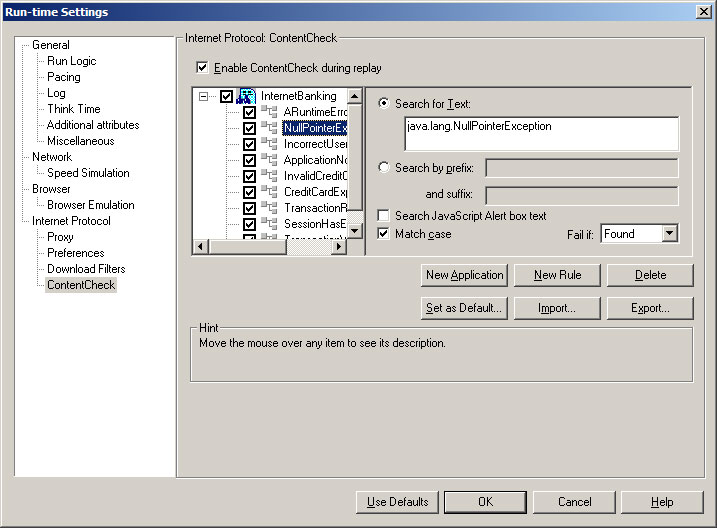
Using web_reg_find functions is fine, but when you get an error LoadRunner reports it as “failed to find text” instead of something more descriptive.
I will always create rules for any error messages I find during scripting and, if I receive an error while running a scenario, I will add the error message from the snapshot in the scenario results directory (the snapshot on error feature is very useful).
All this is pretty obvious if you have taken the time to explore LoadRunner’s features or you have attended a Mercury training session, but I recommend taking things a step further.
- Ask your developers for a list of all the error messages that the application can throw. This should be easy for them to provide if the application is well designed and stores all the message in some kind of message repository instead of sprinkling them throughout the source code.
- Include error message for functional errors that you are likely to encounter. Creating a rule for “incorrect username or password” may save someone 20 minutes of investigation when they first run the script after the database has been refreshed.
If you prefer to have error message you are checking for in the script (where you can add comments to them) instead of the runtime settings, you can use the web_global_verification function instead. The only difference between the two is the error message that LoadRunner will include in its log:
Action.c(737): Error -26368: “Text=A runtime error occurred” found for web_global_verification (“ARuntimeErrorOccurred”) (count=1), Snapshot Info [MSH 0 21]
…compared to:
Action.c(737): Error -26372: ContentCheck Rule “ARuntimeErrorOccurred” in Application “Webshop” triggered. Text “A runtime error occurred” matched (count=1), Snapshot Info [MSH 0 21]
And finally, ContentCheck rules can be easily exported and shared between scripts, which can be a nice time-saver.
Related Posts



14 Comments
Comments are closed.
Stuart, asking the developers for a list of error messages can be an ordeal and might require an act of congress. Our developers are all scattered trhoughout the planet. I found that writing to the log is much better in my case:
lr_fail_trans_with_error(“%s %s %s %d %s %s %s %s %s %s %s %s”,
lr_eval_string(“{success_msg}”),
lr_eval_string(“{JSESSIONID}”),
lr_eval_string(“{service}”),
searchparam,
lr_eval_string(“{SearchModeParm}”),
lr_eval_string(“{cityParm}”),
lr_eval_string(“{stateParm}”),
lr_eval_string(“{airportParm}”),
lr_eval_string(“{poiNameParm}”),
lr_eval_string(“{poiStateParm}”),
lr_eval_string(“{leavingDate}”),
lr_eval_string(“{returningDate}”));
as you can see from success_msg parm, that what they called their error message. I can’t imagine asking them to use any error handling method.
Yours in performance,
Jose Villarreal
Hi !
I need 2 understand better on this Content Check topic. Can u kindly share it with me….?
Kindly send ur mail id….
Thanks in advance.
Hi
I am a Load Runner agent(He he). This is a good information to solve the problems while executing the script. I was a bit confused when I am getting the errors @ run time. Now I am on the page.
Thanks
Arif.
hi guys
i am working on loadrunner i need to know more details of content check plz help me
hi
this is suren
can u help me for understandig abt contentcheck in runtime settings.
and how to do correiation for the script…………
hope u send me mess
thanking u
I have to run 10 actions as part of a performance test.I want to run each action for 10 mins one after the other ( not all at a time ).
Has some one ever done this before or is aware of any such functionality available in LoadRunner 9.10?
rupesh_reddy2020@yahoo.com
hi,
I am newly using load runner tool if i am using the my load test steps i am getting some pblm.pls guide me to run test successfully.
hoping u mail me
byeeeeee
Dearest Stuart,
I am incapable of reading the above article, instead I will ask in broken English for you to kindly please provide information exacting to that within the above article.
I.e. please kindly provide information of the same.
Kindly explain Content Check topic for some critic scenario .
thanks in advanve..
kindly explain web tour app lication recording good but play time user name and password i cannot see the there .i had used load runner
Stuart, I am working as Performance Engineer with MNC in India..Could you please explain the Usage of Content Check with a practical example.
Thanks in advance
Mohan
can you please tell me the content checkpoint in oracl nca application.
i need to verify that afer performaing a search operation i need to verify the data which is appearing in the oracle form
Hi
I have one doubt how to see the LG configaration on loadrunner .
what r the LG configaration
Hi Stuart,
After using the content check in LR, Iam getting the below mentioned errors.
O_Login.c(36): Error: C interpreter run time error: O_Login.c (36): Error — memory violation : Exception ACCESS_VIOLATION received.
O_Login.c(36): Notify: CCI trace: O_Login.c(36): web_url(0x01c76b “analytics”, 0x01c76b “URL=https://o.oracleoutso…”, 0x01c76b “TargetFrame=”, 0x01c76b67 “Resource=0”, 0x01c76b4e “RecContentType=text/html”, 0x01c76b45 “Referer=”, 0x01c7635 “Snapshot=t1.inf”, 0x01c76b2b.
O_Login.c(36): Notify: CCI trace: “Mode=HTML”, 0x01c7c3a “LAST”)
.
O_Login.c(36): Notify: CCI trace: Compiled_code(0): O_Login()
.
Notify: Transaction “SC04_C_R_IP_Lo_01_O_URL_Launch” ended with “Stop” status (Duration: 0.7885 Wasted Time: 0.5464).
Action was aborted.
Ending Vuser…
Starting action vuser_end.
Ending action vuser_end.
Vuser Terminated.
As soon as I remove the content check, the above error also gets fixed. Please suggest.